How can invalid or mal-formed email address (or so called bouncing emails) be captured?
As note: 456378.1 says, after enabling the event WF_MAIL.Disable_Recipient_Ntf_Pref, if a recipient's email address is invalid, an email notification is sent out the SYSADMIN that an email notification could not be sent.
Note:
1. However, this will work only on or after RUP5.
2. Notification preference for SYSADMIN should be MAILHTML or MAIL
to read the complete metalink note, click here
Tuesday, March 25, 2008


Sunday, March 09, 2008
How To Find Out What Time A Timecard Was Submitted Using Wfstatus.sql
I was recently posed a question: To identify when a timecard was submited?
Easy: Use WFSTATUS.sql
Pass parameters the Internal Type of the Timecard and the Timecard Number (It is also the Expenditure_ID as well as the Item Key)
Reference: Metalink Note: 185820.1
Easy: Use WFSTATUS.sql
Pass parameters the Internal Type of the Timecard and the Timecard Number (It is also the Expenditure_ID as well as the Item Key)
Reference: Metalink Note: 185820.1
Macroscope
I find Macroscope pretty useful tool in providing complete picture of the documentation - Easy to use, many quick links to navigate both horizontally and vertically within the product, it is a pleasant experience. Based on PMP Methodolgy. At a very high level, Macroscope documents are created based on Owner's view, User's view and Developer's View. To know more about Macroscope Click here
I saw a pdf which provides more information on this,
Click here to read more about it.
It is interesting to note that Macroscope is considered as a as a Market leader by Gartner as shown in the picture below:
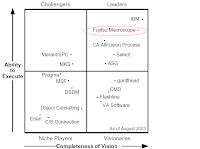
More on this latter.
I saw a pdf which provides more information on this,
Click here to read more about it.
It is interesting to note that Macroscope is considered as a as a Market leader by Gartner as shown in the picture below:

How to display images in a seperate lines?
Pix 1:

I was trying to get two images displayed on a separate lines - although these are adjacent to each other; however to my exasperation, the images were displayed on the same lines. Have tried various tricks, including . It is not consistent. For example these photos had to manually separated using text like this. Whereas, I was able to separate the technorati and LinkedIn icons. I will try to look at some examples later.
On a side note, these are the pictures of a bird that appeared outside our home, after I placed a toy bird - looks exactly like the one in the photo.
Pix 2:

Friday, March 07, 2008
Using Unix Find Command
Find:
find . -name "wfstatus.sql" -print
the above command will search all directories starting from current directory for any file containing wfstatus.sql.
Problem: find displays an error message for any directory I do not have permissions.
So how do I suppress these messages?
The following command will do the trick:
find . - name "wfstatus.sql " -print 2> /dev/null
will suppress cannot read dir or Permission denied messages and print only if it finds the file.
Output of this command:
/oracle/prodappl/fnd/11.5.0/sql/wfstatus.sql
explanation:
/dev/null is a virtual file in Unix; data written to is deleted.
I use the cheatsheet from Stanford.edu (to go to stanford clickhere )
In order to do a case-insensitive search, instead of "name", use "iname":
find . -iname "WFSTAtus.sql" -print 2>/dev/null
if you want the search to be restricted only to files, then use "-type f"
find . -type f -iname "WFSTAtus.sql" -print 2>/dev/null
find . -name "wfstatus.sql" -print
the above command will search all directories starting from current directory for any file containing wfstatus.sql.
Problem: find displays an error message for any directory I do not have permissions.
So how do I suppress these messages?
The following command will do the trick:
find . - name "wfstatus.sql " -print 2> /dev/null
will suppress cannot read dir or Permission denied messages and print only if it finds the file.
Output of this command:
/oracle/prodappl/fnd/11.5.0/sql/wfstatus.sql
explanation:
/dev/null is a virtual file in Unix; data written to is deleted.
I use the cheatsheet from Stanford.edu (to go to stanford clickhere )
In order to do a case-insensitive search, instead of "name", use "iname":
find . -iname "WFSTAtus.sql" -print 2>/dev/null
if you want the search to be restricted only to files, then use "-type f"
find . -type f -iname "WFSTAtus.sql" -print 2>/dev/null
Subscribe to:
Posts (Atom)